
Sending via SMTP
Omnivery supports sending messages using SMTP submission. SMTP submission is a great option for systems that support sending via a custom SMTP server. It is ideal for integrations where implementing an API would be time-consuming or expensive.
Sending using APIs should always be preferred as it provides much more efficient and comfortable integration for developers.
Omnivery supports sending via SMTP. Our servers at smtp.omnivery.net are listening on port 587. We support insecure connections, but we strongly recommend upgrading to TLS encryption using the STARTTLS command.
Use STARTTLS
Plaintext sessions are still accepted, but they are deprecated and will stop being supported. Always issue
STARTTLSbefore authenticating, so your credentials are never sent in the clear.Implicit TLS (
SMTPS, port465) is not offered. If your client defaults to port 465, change it to587withSTARTTLS. Port25is our inbound MX and does not accept submission.
Domain setup
Make sure you have your sending domains set up first. Please read the documentation on setting up domains.
Setting up credentials
Sending messages using SMTP requires authentication with the correct credentials. Before you start, make sure you have the correct domain selected in the top domain selection menu. SMTP user credentials are managed in the Credentials menu on the SMTP users tab. You will see a list of existing SMTP users here and have the ability to add new ones if your account has sufficient rights.
Click the Add user button and you will be presented with a dialog to enter the desired username (in the form of an email address), password, and note (to help you identify individual user accounts).
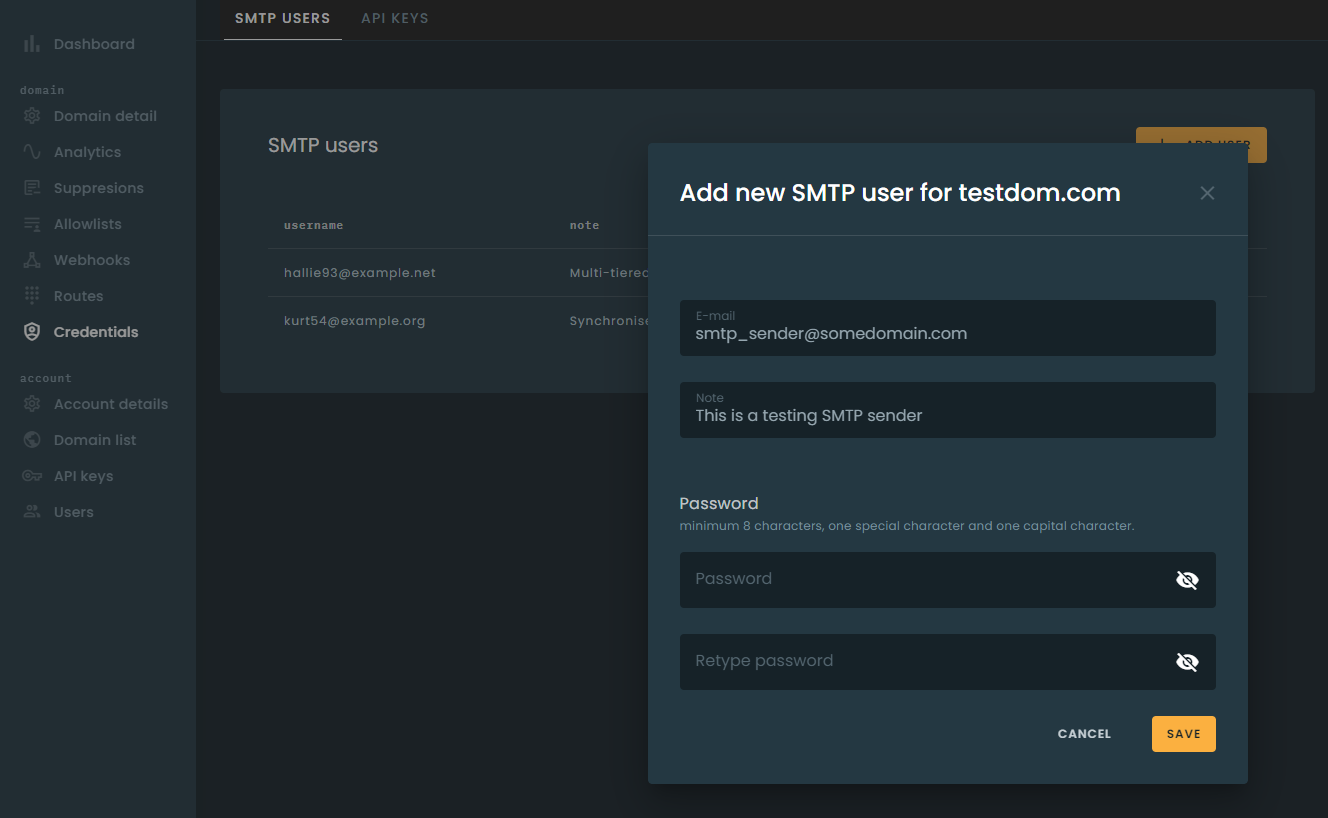
The email address you enter as a username does not necessarily have to be a working email address. Use of email addresses in domains under your control is strongly recommended.
Requirements
The SMTP communication must meet the following minimum requirements:
AUTH LOGINorAUTH PLAINmust be performed to authenticate the session using credentials.CRAM-MD5and other challenge-response mechanisms are not supported.MAIL FROMaddress must be from the sending domain, e.g., if your sending domain is ov.emaildemos.com, the address passed in the command must be @ov.emaildemos.com.RCPT TOcommand must be issued at least once. If multiple RCPT TO commands are issued, then all individual recipients will receive the same message but will be tracked independently. A single message may carry at most 50 recipients.
The DATA transfer of the message content must conform to RFC5322. In addition to the standard, we have the following requirements:
- Exactly one
Fromheader is required. While the standard technically permits multiple From addresses, this is not supported by many large mailbox providers and would result in delivery issues. - Exactly one
Toheader is required, and it must contain at least one address. Multiple recipients should be separated by a comma in the single To header. - At most one
Ccheader is allowed. Multiple recipients should be separated by a comma in the single Cc header. - Exactly one
Subjectheader is required.
The
Fromheader address MUST be aligned with the sending domain, e.g., if your sending domain is ov.emaildemos.com, then your From header address must be either @ov.emaildemos.com or @emaildemos.com.Alignment with a parent domain is accepted one level up only. If your sending domain is a.b.emaildemos.com, a From address of @emaildemos.com will be rejected.
-
The local part of a
FromorReply-Toaddress must not be quoted. Addresses such as"john smith"@example.comare rejected, because receiving systems do not agree on how to parse them. -
MIME headers provided in
DATAthat do not conform to our standards or are in conflict with our standard headers will be removed or replaced. This includesDate,Message-ID,List-Unsubscribe,Feedback-IDandX-Mailer, which we set or rewrite on every message. -
Senders MUST honor the
4xxand5xxSMTP response codes as respectively defined by the SMTP standard.4xxtemporary failures should be retried at a later time with a minimum interval of 1 minute.5xxpermanent failures MUST NOT be retried, as such errors will not result in a different outcome no matter how many times they are retried.
SMTPUTF8 is supported, so internationalized addresses may be used.
Limits
| Limit | Value |
|---|---|
| Recipients per message | 50 RCPT TO commands per transaction |
| Message size | Set per domain on your account. The default is 10 MB |
| Connection rate | 600 new connections per minute, per source IP address |
| Scheduled delivery | Up to 3 days (72 hours) ahead |
| Failed logins | 3 per username per minute, 3 per IP address per 5 minutes |
The advertised SIZE is not your account limit
Our servers advertise a large
SIZEvalue in theEHLOresponse. That is a server-wide ceiling, not your limit — the limit that applies to your messages is configured per domain and is considerably smaller (10 MB by default).Because the size is checked once the message has been received, an oversized message is rejected with
552after it has been transferred. Check your domain's configured limit rather than relying onSIZE.
Authentication failures
Repeated authentication failures temporarily lock out the username and the source IP address. The lockout is a 4xx temporary failure and clears by itself — wait and retry rather than looping. Verify your credentials before reconnecting, as repeated attempts extend the lockout.
Source IP addresses listed by Spamhaus are refused with a 5xx permanent failure and are blocked for 24 hours. Delisting at Spamhaus does not clear the block immediately.
Duplicate messages
Messages are deduplicated per sending domain. If the same recipient, subject and body are submitted more than once within 3 minutes, only the first copy is delivered.
Duplicates are accepted, then suppressed
A duplicate is accepted with a
250response and is suppressed before delivery, so there is no SMTP error and no bounce. It is not lost track of: the message is logged with the rejected action and a duplicate suppression reason, and you can see it in your message logs in the UI. Note that suppressed duplicates are recorded in the logs only — they do not generate a webhook event.If your application legitimately sends identical messages to the same recipient in quick succession (for example repeated password-reset requests), vary the message content or subject, otherwise only the first will arrive.
Passing message options
When sending a message via SMTP, you can pass additional sending options via custom MIME headers listed in the table below.
Headers that take a yes/no value accept yes, true, 1 or on to enable, and no, false, 0 or off to disable. Values are case-insensitive. A value we do not recognise is ignored, and your domain's configured default applies.
| Header | Description |
|---|---|
| X-OV-Tag | Tag string used for aggregating stats. See Tagging for more information. You can mark a message with several categories by setting multiple X-OV-Tag headers. Multiple tags may also be comma-separated in a single header. |
| X-OV-testmode | Enables sending in test mode. Pass yes if needed. See Sending in Test Mode. |
| X-OV-Track | Toggles tracking on a per-message basis. See Tracking Messages for details. Pass yes or no. Overrides the domain-level setting. |
| X-OV-tracking_click | Toggles click tracking on a per-message basis. Overrides domain-level setting. Pass yes or no. Only applies when tracking is enabled. |
| X-OV-tracking_open | Toggles open tracking on a per-message basis. Overrides domain-level setting. Pass yes or no. Only applies when tracking is enabled. |
| X-OV-tracking-pixel-location-top | Places the open-tracking pixel at the top of the message body instead of the bottom. |
| X-OV-Require-TLS | Use this header to enforce TLS encryption during message delivery. Pass yes. If the receiving server does not offer TLS, delivery fails rather than falling back to an unencrypted connection. Only an affirmative value turns enforcement on; anything else leaves delivery at the default. |
| X-OV-Recipient-Variables | Use this header to substitute recipient variables referenced in the message. |
| X-OV-Variables | Use this header to attach custom JSON data to the message. Invalid JSON is rejected. |
| X-OV-Substitutions | JSON object of substitutions applied to the message body, in the SendGrid style. Shared by every recipient. Applied only to a SendGrid submission - over SMTP, one that carries X-SMTPAPI; on its own over plain SMTP it is ignored. Invalid JSON is rejected. |
| X-OV-Recipient-Substitutions | JSON object of substitutions keyed by recipient address, so one submission can carry different tokens per recipient. Applied only to a SendGrid submission, as above. Invalid JSON is rejected. |
| X-OV-Template | Template filename to use to generate message content. |
| X-OV-Template-Variables | Use this header to pass JSON data to the template. Unlike X-OV-Variables, data passed in this header will not be passed in the message headers. |
| X-OV-Deliver-By | Schedules the message for delivery at the specified time, up to 3 days (72 hours) ahead; the value must be an RFC-2822 date with a numeric UTC offset, for example Fri, 03 Oct 2026 09:00:00 +0200. |
| X-OV-Callback-URL | Set the webhook URL to post event data. Setting the URL at message level overrides the domain setting. |
| X-OV-Callback-Format | Set the format of webhook calls to use. Supported formats are bloomreach, mailgun, sendgrid and sparkpost. The value is case-sensitive; an unrecognised value is ignored and the default format (mailgun) is used. |
| X-Campaign-ID | Campaign name used to group statistics. X-Job-ID is accepted as a fallback when this header is absent. |
Scheduled delivery
X-OV-Deliver-By must be an RFC-2822 date. A day name and seconds are optional, and the zone must be numeric — alphabetic zones such as GMT or UTC are not accepted, and neither is ISO-8601. If the zone is omitted the time is read as UTC.
| Value | Result |
|---|---|
Fri, 03 Oct 2026 09:00:00 +0200 |
Accepted — the canonical form |
3 Oct 2026 09:00 +0200 |
Accepted — no day name, no seconds |
Fri, 03 Oct 2026 09:00:00 |
Accepted — read as UTC |
Fri, 03 Oct 2026 09:00:00 GMT |
Rejected — alphabetic zone |
2026-10-03T09:00:00+02:00 |
Rejected — ISO-8601 is not RFC-2822 |
| A time more than 3 days ahead | Rejected — the message is refused, not capped |
| A time in the past | Accepted and sent immediately |
The header is not delivered to the recipient, and a scheduled message is indistinguishable from an immediate one. Templating, tracking, the Date header and DKIM signing are all applied at the real send time rather than at submission. A message-level webhook set with X-OV-Callback-URL and X-OV-Callback-Format is kept for the scheduled message's events.
Headers that are accepted but ignored
The following headers are accepted for compatibility and currently have no effect: X-OV-Dkim, X-OV-Skip-Verification, X-OV-Time-Zone-Localize and X-OV-Delivery-Time-Optimize-Period. Do not rely on them.
Migrating from another provider
Existing X-Mailgun-* headers are accepted and translated automatically, so most Mailgun integrations work without changes:
X-Mailgun-Tag, X-Mailgun-Track, X-Mailgun-Track-Clicks, X-Mailgun-Track-Opens, X-Mailgun-Require-TLS, X-Mailgun-Drop-Message, X-Mailgun-Recipient-Variables, X-Mailgun-Deliver-By, X-Mailgun-Template and X-Mailgun-Template-Variables.
For SendGrid, the X-SMTPAPI header is parsed as JSON. Its unique_args are read as message variables and its sub object as substitutions. A malformed X-SMTPAPI header is rejected with a 5xx, rather than being silently ignored.
sub is read in both of SendGrid's shapes. A plain string value applies to every recipient. An array value is positional against the to list in the same header, so each recipient gets the value at their own index:
X-SMTPAPI: {"to": ["alice@example.com", "bob@example.com"],
            "sub": {"-name-": ["Alice", "Bob"]}}
If both a Mailgun header and its Omnivery equivalent are present, the X-Mailgun- value wins — it is translated into the X-OV- header and replaces whatever was there. Send only one of the pair.
SparkPost
The X-MSYS-API header is parsed as JSON and translated:
| X-MSYS-API field | Omnivery equivalent |
|---|---|
campaign_id |
X-Campaign-ID |
metadata |
X-OV-Variables |
tags |
X-OV-Tag |
options.open_tracking |
X-OV-tracking_open |
options.click_tracking |
X-OV-tracking_click |
As with the Mailgun headers, a translated value replaces the matching X-OV- header if you send both. The tracking options can switch tracking off, or on where your domain has tracking enabled. They cannot enable it for a domain that does not track.
All other fields are ignored, including options.transactional (whether a message is transactional is set on your domain), options.skip_suppression, options.ip_pool and options.sandbox. substitution_data is ignored too. SparkPost's own SMTP service does not apply it either, because its template language is API-only.
A tag that contains a comma is dropped, as is any value that contains a line break or other control character. The X-MSYS-API header itself is removed, but the values translated from it are not: like any X-OV- header you send, X-OV-Variables, X-OV-Tag and the tracking headers are delivered with the message, so metadata is visible to the recipient. If its value is not a valid JSON object, the message is rejected with a 5xx.
To use SparkPost-style templating, submit through the Sparkpost API rather than over SMTP. For per-recipient merge over SMTP, use X-OV-Recipient-Variables with %recipient.KEY% tags, which work regardless of which provider you are migrating from.
Error responses
Temporary failures (4xx) should be retried. Permanent failures (5xx) must not be.
| Response | Meaning |
|---|---|
Too many connections, please slow down |
More than 600 new connections in a minute from your IP — a temporary 4xx; reuse connections rather than opening one per message |
Too many login attempts, try again later |
Authentication lockout — wait, then retry with correct credentials |
Too many recipients |
More than 50 RCPT TO commands in one transaction |
Exactly one 'From' header must be present |
Zero or multiple From headers |
Exactly one 'To' header must be present |
Zero or multiple To headers, or a To with no address |
Only one 'Cc' header can be used |
More than one Cc header |
We accept only messages with a singular Subject header |
Zero or multiple Subject headers. The session is disconnected |
Sender address doesn't match the sending domain |
The From header is not aligned with the sending domain |
From address local part must not be quoted |
A quoted local part, such as "john smith"@example.com |
Reply-To address local part must not be quoted |
As above, for Reply-To |
Reply-To address not aligned |
Reply-To alignment is enforced on your domain |
Message too big - size of Nb exceeds your domains limit |
Larger than your domain's configured message size |
Incorrectly formated variables. Use JSON to encode data |
X-OV-Variables is not valid JSON |
Incorrectly formated substitutions. Use JSON to encode data |
X-OV-Substitutions is not valid JSON |
Incorrectly formated recipient variables. Use JSON to encode data |
X-OV-Recipient-Variables is not valid JSON |
Incorrectly formated template variables. Use JSON to encode data |
X-OV-Template-Variables is not valid JSON |
Incorrectly formated recipient substitutions. Use JSON to encode data |
X-OV-Recipient-Substitutions is not valid JSON |
Incorrectly formated X-SMTPAPI header. Use JSON to encode data |
X-SMTPAPI is not valid JSON |
Incorrectly formated X-OV-Deliver-By header... |
The scheduling date is not a valid RFC-2822 date |
Requested delivery time is more than 3 days in the future... |
Scheduled too far ahead |
You are not allowed to send from this domain |
The domain is not on your account, or is disabled |
Your IP is not welcome here |
The source IP is listed by Spamhaus and is blocked for 24 hours |
Temporary local error, try again later |
A transient problem on our side — retry |
Message security
Errors and attacks are not uncommon, and we do our best to protect your account. Check out how we deduplicate messages and how you can further secure your domain.